How to Cite Census, Vital Records, and Online Images So Your Tree Stays Defensible
A dead Ancestry note and a mismatched death index—rebuild census and vital-record citations with three layers so your shared tree stays followable.

A cousin sends a screenshot of a residence fact in a shared tree. The note says "Ancestry." No year. No county. No URL. The link in the tree is dead. You remember the household. You cannot prove which page you used, and you cannot open it again from the note alone.
These scenes are composite shared-tree patterns, not a named family's private tree.
That gap shows up constantly in shared trees. A usable citation relocates the same item and leaves enough detail to judge how strong the evidence is. A prettier Source Information paste does not. The Board for Certification of Genealogists treats source citation as fundamental to research quality. BCG's application materials point to Evidence Explained and Chicago as guides for genealogical writing. Family History Daily makes the same practical point: citing means recording the source of each fact, and unsourced trees are hard to trust.
You do not need a certificate to use those habits. You need enough detail that a skeptical cousin, a future you, or a journal editor can follow the trail. This post walks one census image and one vital-record image through that rebuild. For the full standard behind the habits, use Evidence Explained and Elizabeth Shown Mills's free QuickLessons. The post teaches principles and field capture. It does not copy Evidence Explained templates.
The dead "Ancestry" note and the mismatched death index
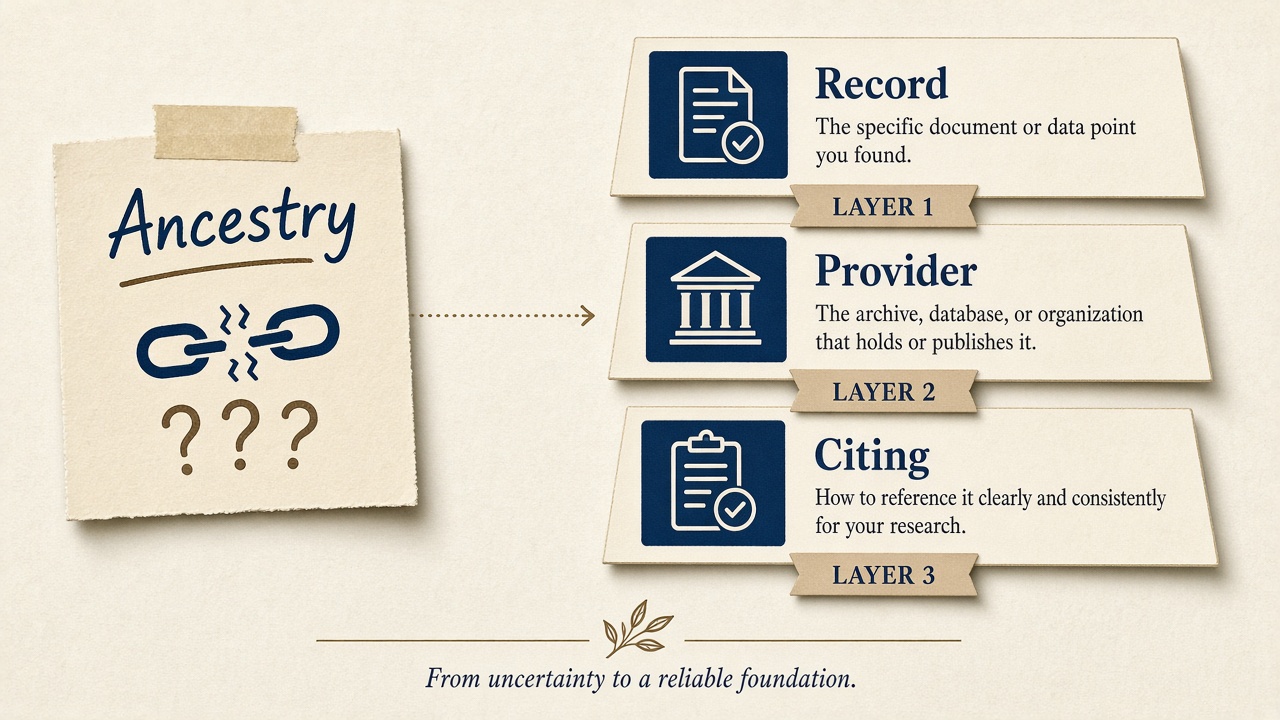
Take a familiar shared-tree pattern. Someone attached a 1930 residence to a person and typed "Ancestry" in the citation field. Months later the Ancestry session URL expired. The household table in the search hit spelled the surname one way. The page image, when someone finally reopened it, spelled it another. Nobody recorded which version they trusted, so the fact sits in limbo.
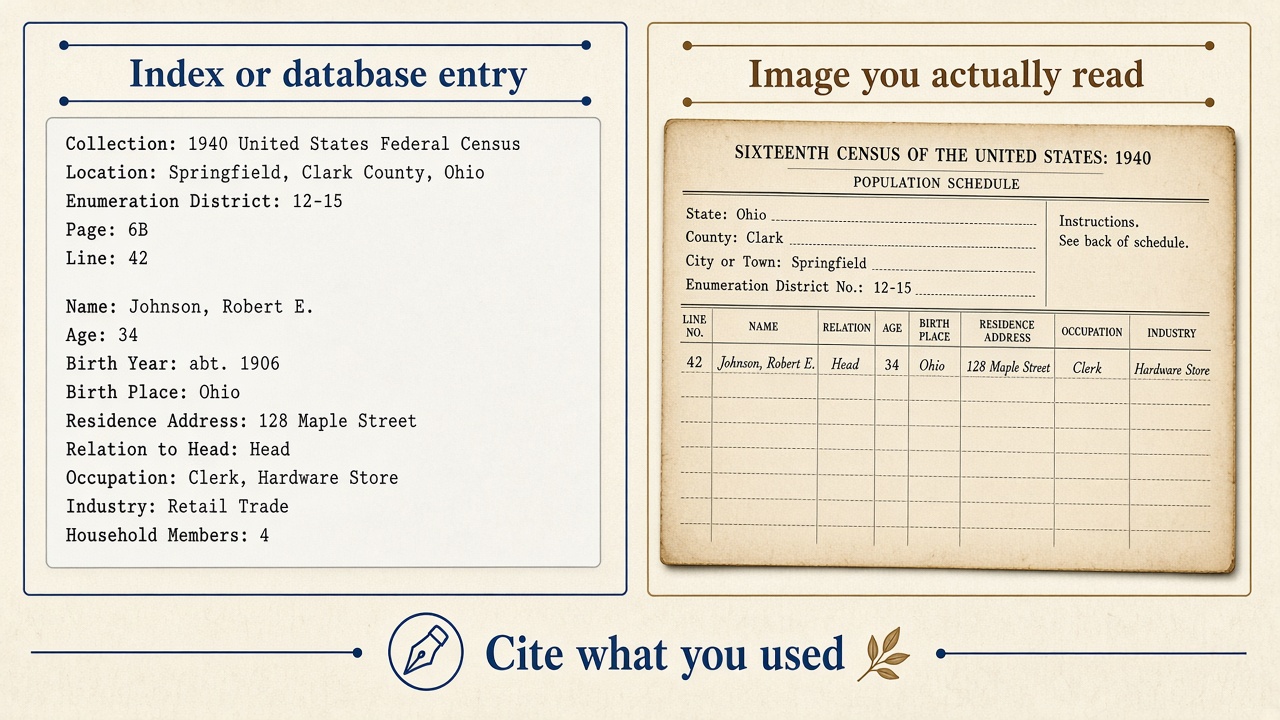
Two problems stack here. First, a website-only label leaves out the record you actually read. Second, an index line and a page image are different items. Cite the item you eyeballed. The Evidence Explained forum discussion on census data from Ancestry and similar sites is blunt on that point. QuickLesson 26 applies the same rule to Ancestry vital records: when a database-with-images collection offers both a typed entry and a scan, build your note around the scan.
St. Louis Genealogical Society's census citation guide draws the same line between microfilm, online images, and indexes. Treat indexes as finding aids. Cite the image or extract you actually used for any data you claim.
On one Ancestry census hit, the quick check looks like this. Open the record. Look at the typed household table beside or above the viewer. Open the full page image and read the line yourself. If your fact came from the image, your citation describes the image. If you never opened the image, say you used the database entry.
Three layers that make the trail followable
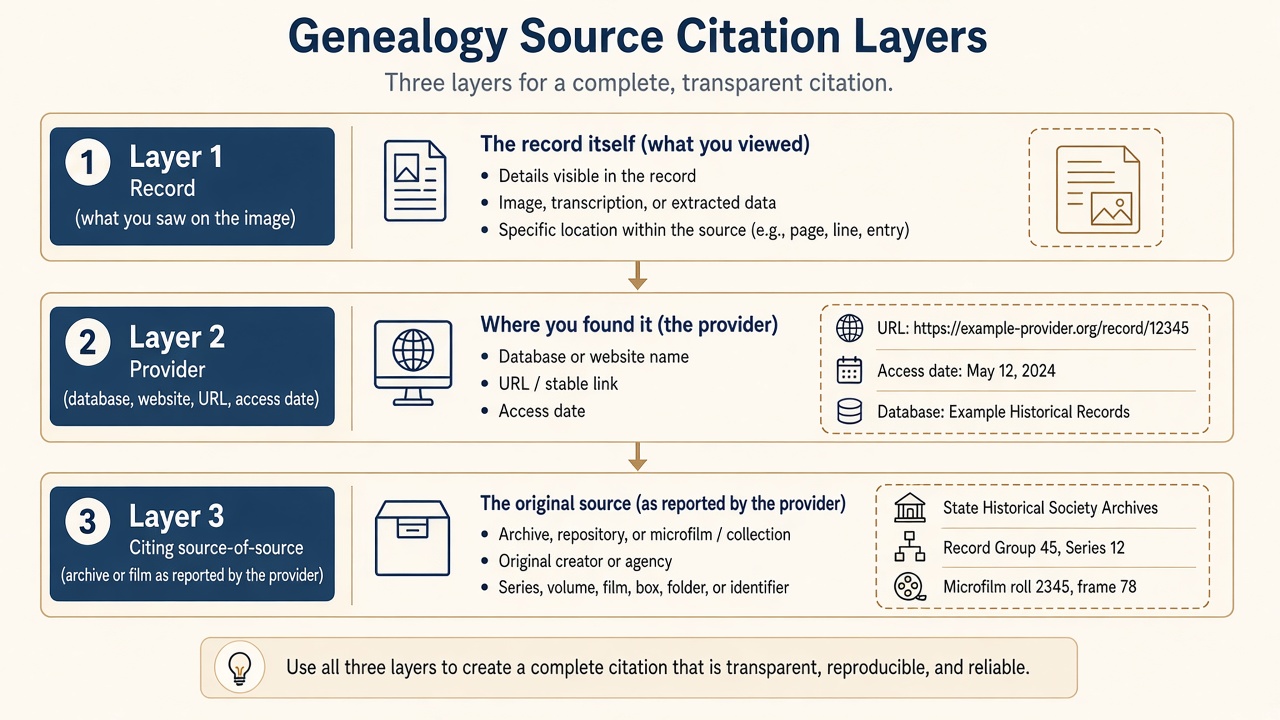
Most online materials need three layers. Genealogical.com's summary of Evidence Explained's layered-citation tip describes them this way.
Layer 1 is the record as imaged: what you can confirm from the item itself (year, place, schedule, certificate number, names, page identifiers).
Layer 2 is the online provider: database or collection title, website, path or stable ID, URL, and the date you accessed or downloaded it.
Layer 3 is the source of the source: where the provider says the original sits (NARA film, state archive series, county clerk), reported as the provider's claim.
Evidence Explained joins those layers with semicolons in a single reference note. In your own notes you can draft each layer on its own line first, then combine them once the fields are solid.
Two ethics rules matter here. A website-only citation leaves out the record you actually read. An archive-only citation that pretends you handled the original in person, when you used a commercial scan, is "borrowing" a citation. QuickLesson 26 and the layered-citation tip both warn against that habit.
When the NARA publication or roll appears only in Ancestry's "Source Information" text and not on the isolated image, report it in Layer 3 as the provider citing that film. The EE note on NARA "citing" language covers that case.
Rebuilding the census page that only said Ancestry
Back to the dead note. You find the household again on Ancestry (the same scene works on FamilySearch, MyHeritage, or Findmypast if that is where you open the image). This time you work from the image, then add the provider, then add the provider's claimed original.
Start on the sheet. Read off what the page itself shows when those fields are visible: census year, state and county, schedule type (usually population), locality (township, city, ward), enumeration district, sheet or page number (stamped versus handwritten if both appear), dwelling and family numbers, and the person or household you used. Those details are Layer 1. StLGS's census tables and NARA's General Information Leaflet 17 (PDF) help later when you move offline. For an online image, Layer 1 still starts with what the page itself shows.
Then capture Layer 2 from the site you actually used: database or collection title (quotation marks in EE style), website title (italics in EE style), path waypoints from the browse or source bar or a stable ID when the site offers one, URL, and access or download date. Truncate tracking junk after ? carefully, as QuickLesson 26 discusses. Ancestry citations often use a home-style URL plus a path. FamilySearch may give an ARK or PAL. QuickLesson 25 explains why paths and waypoints matter, and why image numbers belong with the provider layer rather than mixed into Layer 1 as if they were stamped on the original sheet.
If Ancestry or FamilySearch names a NARA microfilm publication and roll, put that in Layer 3 with clear "citing ..." language so you do not pretend you pulled the reel yourself. See EE node 1824 and the forum census thread.
After the first full note, later mentions of the same page can shorten to year, jurisdiction, ED or sheet, person, and a short provider cue. Keep the first note complete so the short form still resolves. Do not paste Evidence Explained QuickCheck models into your tree. Build a short form that matches your own style sheet.
If you view the same census image on more than one site, write Layer 2 for the site you actually used. The Layer 1 details from the image should match. The provider layer will not.
Some collections are browse-only. You click into a county, a volume, then a film strip. QuickLesson 25 covers ARKs, PALs, paths, and waypoints for FamilySearch and Ancestry digital images. Record the path with clear waypoints (EE examples use > between stops such as collection, county, and volume). Put image or frame numbers in Layer 2 with the provider. Layer 1 stays limited to identifiers visible on the original register or certificate. Use a stable identifier when FamilySearch offers an ARK or PAL. Session URLs often die. If you bounce between a FamilySearch browse path and an Ancestry database hit for the "same" film, write two Layer 2 blocks. Same original content can sit behind different provider citations.
Fixing the death certificate after the index disagreed
The same tree often has a death date pulled from a typed Ancestry extract. The index spells the given name one way. The certificate image spells it another. If the note never said you opened the scan, you cannot tell which spelling you claimed.
QuickLesson 26 walks through a Kentucky death certificate imaged in Ancestry's "Kentucky Death Records, 1852-1965" database-with-images collection. Borrow that lesson's thinking for your own notes, and leave the published templates in the book.
Open the image and confirm name, death date, place, certificate or file number, and any parent or informant lines you plan to use. Indexed fields alone are incomplete. Read the source bar or path on the provider page and capture the database title and browse waypoints. Treat "Source Information" as a list of fields to copy. QuickLesson 26 notes that Ancestry's Source Information block may only rename the database in Source List style. That block alone is incomplete as a reference note.
Build Layer 1 from the certificate image. Build Layer 2 from database, website, path or URL, and access date. Verify Layer 3 by comparing Ancestry's "Original data" line to film or volume IDs visible in the path or on the image jacket when present. When you copy the provider's source line exactly, introduce it with "citing". If the image alone does not give enough archival ID, recent EE forum guidance on an Ancestry marriage database suggests leading with the database layer and using the complex-website pattern. Skip archive details you cannot see on the image (EE node 2349).
The same sequence works for marriage and birth certificate images on Ancestry, MyHeritage, Findmypast, or a state archive viewer. Always cite the platform and collection you opened. If the index spelling differed from the image, cite the image reading in the reference note and park the index variant in a research note if you need it later.
What the auto-citation gave you and what you still rewrote
In both scenes, Ancestry or FamilySearch probably offered auto-generated text. That text is a useful list of fields to copy. It is rarely a finished, layered reference note.
Worth copying into your draft: database or collection title, the suggested original-data line (then verify), record identifiers the site exposes, and the attached media filename or image number.
You almost always still rewrite: missing ED, sheet, dwelling or family, or certificate numbers you can see on the image, no access date, no path waypoints, archive language that sounds like you visited NARA when you did not, and indexed spelling that differs from the image.
MyHeritage's citation wiki warns that software and site auto-citations often miss essentials. FamilySearch's five-question checklist (who, what, when, where, wherein) is a good pass after you paste auto-text into a scratch pad.
Ancestry's own help on managing sources in trees explains Citation, Source, and Repository in Ancestry's vocabulary, and notes that attaching a record auto-connects a source to facts. Use that for convenience. Still rewrite the note you would publish or share.
Saving the rebuilt notes in RootsMagic and similar tools
Once the layers exist on paper or in a scratch file, put the same thinking into fields your software already has.
Per RootsMagic help on adding a citation and using a source template: add citations from the Sources page or from Edit Person. Attach the citation to the fact (birth, death, residence). A person-only attachment leaves it unclear which claim the source supports. Editing a master source changes every citation that uses it. Templated sources expose Footnote, Short Footnote, and Bibliography strings. Use CreditLine (or free-form or page fields) for source-of-the-source wording when the template supports it. Free-form sources still work when no template fits. Put Layer 1 detail in the citation detail or page field so the master source stays reusable.
RootsMagic appears here as a software walkthrough example. There is no RootsMagic commission program in the research for this post. Other desktop tools (Family Tree Maker and similar) follow the same master-source versus citation-detail split.
On Ancestry online trees, attaching a record auto-adds a source to facts. Open it and enrich the note. Manual Add Source from the Facts tab still matters for deeds, books, and off-site finds (Ancestry Support). Family History Daily warns that hyperlinks alone can rot. Keep the full URL and access date in plain text in the citation note, and attach the image as media when you can.
A one-page style sheet for the next hundred notes
Keep punctuation and field order consistent across your database. Family Locket's citations-simplified overview stresses consistency and a two-part habit (source identification plus access details). MyHeritage's wiki summarizes Thomas W. Jones's five questions from Mastering Genealogical Documentation.
A one-page sheet next to your monitor can ask five questions every time.
- Who created or is named on the record?
- What is the record (census schedule, death certificate, register)?
- When was it created, and when did you access the online copy?
- Where is or was the original held, as best you can document?
- Wherein / why believe: database path, URL, image versus index, and any "citing ..." caveat?
Add your house rules: italics for website titles, quotation marks for database titles, access-date format (ISO 2026-09-09 works well), and how you truncate URLs. Evidence Explained 4th edition adds a tutorial chapter on building a citation (five Ws, building blocks, and universal templates) per Genealogical.com's overview. Read that chapter. Do not paste its fourteen templates into a blog comment or a shared GEDCOM as if they were public domain boilerplate.
Optional AI as a scratch pad you verify
AI chat tools can turn a field checklist into a first-pass layered note. That is optional and secondary.
Safe use means feeding only fields you already captured from the image and provider page, asking for Layer 1 / 2 / 3 labeled output, and comparing every token against the image and the site before you save it to your tree.
Unsafe use means pasting an Ancestry URL and accepting the model's citation without opening the image, treating any AI product as a citation standard, or publishing unchecked AI wording in a journal submission or BCG portfolio.
There is no affiliate relationship to invent for OpenAI, Anthropic, Claude, or Cursor in this workflow. If you use those tools, you use them as scratch pads you verify by eye.
Tools and next reading
Some links may earn a commission at no extra cost to you. We only recommend tools we would use for the workflow described. Affiliate enrollment and rates are verified in partner dashboards before go-live—not invented here.
Standards and free lessons
- Evidence Explained hub
- QuickLesson 25: ARKs, PALs, paths, and waypoints
- QuickLesson 26: Thinking through an Ancestry.com citation
- Layered citations tip (Genealogical.com)
- Evidence Explained 4th edition (Kindle listing)
- NARA GIL 17: Citing Records in the National Archives
- BCG skillbuilding: Citing Your Sources
Platform help and record access
- FamilySearch: five steps to a source citation
- FamilySearch Wiki: crafting a genealogical source citation
- MyHeritage Wiki: how to write genealogy source citations
- StLGS citations hub and census page
- RootsMagic: adding a citation and source templates
- Record images to practice on: Ancestry, FamilySearch (many collections free), MyHeritage, Findmypast (UK census and parish images)
Memberships matter here only as the places you view the images this tutorial describes. At publish time, add standard affiliate disclosure where links earn commission. This draft does not apply to any program and invents no commission rates.
One rebuild that sticks
Pick one census image and one death or marriage certificate image you already use. Rewrite each citation with Layer 1 from the image, Layer 2 from the provider page, and Layer 3 as a clear "citing ..." line for the provider's claimed original. Attach the improved note to the fact in your software. That single pair of rebuilds will teach the habit faster than reading another abstract guide.
Always verify sources yourself
This tutorial provides general guidance. Cross-check citations against official style guides and verify all records with primary sources when possible.